







Blog
How to Fix a Disposable Vape That Will Not Hit

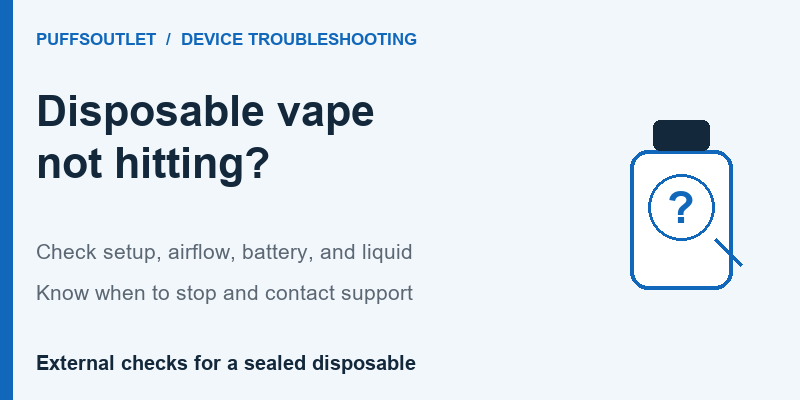
If a disposable vape will not hit, check the exact model’s instructions, remove only its intended shipping covers, confirm any documented controls, and inspect the external air inlets. Then check battery and liquid status separately. Charge only a model designed to recharge and only when its condition permits it. If these checks do not resolve the problem, contact support rather than opening the device.
“Not hitting” usually means no vapor appears, but the accompanying symptoms matter. A blocked draw, a blinking light, and normal airflow with no vapor need different checks. This guide is for adult users assessing a sealed disposable they already have. It covers external troubleshooting; it does not provide internal repair instructions or promise that every failed device can be restored.
Stop First if the Device Shows Warning Signs
Skip routine troubleshooting if there is leaking liquid, visible damage, unusual heat, or activation without use. LOST MARY’s current troubleshooting guidance advises stopping for leakage or self-activation and says not to charge a damaged, leaking, overheating, or water-exposed device. Keep it away from children and pets and contact the manufacturer.
London Fire Brigade also identifies unusual heat, bulging, and hissing as battery warning signs. If the device catches fire, leave the area and contact local emergency services. Do not continue testing it or try to tackle the fire yourself.
Identify What Happens When It Does Not Hit
Before changing anything, note whether the problem began immediately after unpacking, appeared during ordinary use, or followed a drop, leak, or water exposure. This history helps organize the next check without guessing which internal part has failed.
| What you observe | What it can tell you | Next check |
| No light or screen response | The device is not showing an expected response; the cause remains uncertain | Check the documented activation method and battery status |
| A light appears but there is no vapor | A visible response does not prove that liquid or the heating system is usable | Read the indicator meaning, then assess battery and liquid separately |
| Airflow feels restricted | An intended opening may be covered or obstructed | Inspect shipping covers, your grip, and accessible outer surfaces |
| A rechargeable model shows a full battery but produces no vapor | Charging alone has not resolved the problem | Check liquid status and seek support if unresolved |
| Liquid, abnormal heat, or self-activation | Routine testing is no longer appropriate | Stop using and charging it |
The table directs you to a check, not a definite diagnosis. Avoid treating the absence of a light as proof of a dead battery or a blinking light as proof that the liquid is empty. Indicator behavior varies by model.
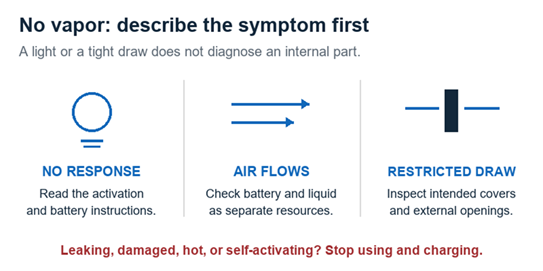
Describe what happens before choosing a check. A symptom alone does not diagnose an internal component.
External Checks for a Disposable Vape That Will Not Hit
1 Identify the Model and Its Intended Setup
Find the full model name and version on the device or packaging. Use the official manual to identify its activation method, air inlet locations, indicators, and whether it is rechargeable. If there is an intended power switch, lock, or airflow control, follow the procedure for that exact device.
Do not apply an internet “reset” sequence simply because another product looks similar. A sequence intended for a reusable pod kit may not apply to a sealed disposable. If you cannot identify the device or find its instructions, ask the manufacturer or seller before improvising.
2 Check Intended Shipping Protection
For a brand-new unit, look for the removable protection described in its instructions. A mouthpiece stopper or inlet sticker may still be in place. The GEEKBAR HERO manual, for example, identifies a top silicone plug and a bottom sticker to remove before use.
Remove only the items identified as shipping protection. Do not pry off a fixed mouthpiece, lift a gasket, or pull out an unfamiliar component. Packaging arrangements differ, so the HERO example is not a diagram of every disposable.
3 Inspect the External Air Path
Compare your grip with the documented air inlet positions. A finger or accessory can cover an opening. The IQOS UK troubleshooting guide identifies covered air holes and incomplete unpacking as possible reasons a new disposable does not work.
Look for visible debris on accessible outer surfaces. Keep cleaning outside the device, using a dry cloth or tissue to wipe away loose material without pushing it into an opening. Do not probe the airway with a pin or toothpick, and do not force air through it.
For a tight draw, see our guide to how to unclog a disposable vape. If air moves normally but no vapor appears, continue with the battery and liquid checks instead of repeatedly cleaning an unobstructed opening.
4 Check Battery Status and Charging Eligibility
Read the model’s indicator instructions. A screen may distinguish battery charge from liquid status; a single light may provide less information. On the HERO, its manual identifies battery information on the right and a liquid indicator on the left. Other devices can use different layouts.
If the battery is depleted, first confirm whether charging is an intended feature. For a rechargeable device in suitable condition, follow the specified cable and power-supply requirements. Electrical Safety First notes that charging voltages and battery capacities vary, so compatible equipment must be checked against the manufacturer’s instructions.
Charge on a clean, flat surface where you can see the device, away from flammable materials, as advised in the FDA’s vape battery guidance. Stay nearby and follow the documented completion signal. Our guide to how to charge a disposable vape explains these checks in more detail.
A charging light confirms only the response described by the manual. It does not establish that the device can produce vapor. Do not keep it charging longer to force a fault to disappear, or adapt a non-rechargeable device for charging.
5 Assess Liquid Status and the End of Use
If charging does not resolve the problem, assess remaining liquid using the model’s documented indicator or other manufacturer guidance. Battery energy and liquid supply are separate. A full battery cannot replenish a depleted sealed reservoir.
The ELFBAR support page says that a BC10000 producing no vapor may be empty or have a coil at the end of its life. It advises checking the liquid display and contacting support if the issue remains. That explanation is specific to the named model and does not establish the cause in every device.
Our guide to signs a disposable vape is almost empty covers depletion in more detail. If the flavor has turned burnt, stop using it and consult what to do when a disposable vape tastes burnt. Repeated test puffs cannot repair a damaged wick.
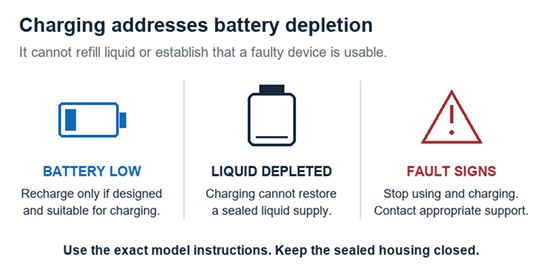
A full battery and usable liquid are separate checks. Fault signs take priority over further troubleshooting.
Brand New Failure and Failure After Use
A device that has never worked calls for checking unpacking and intended setup first. Once those are confirmed, unresolved failure belongs with the seller or manufacturer. IQOS UK notes that a new unit can be faulty or damaged during transportation and may be unusable. Being new does not rule out a fault.
A device that previously worked needs a different history. Note whether there was a battery warning, a liquid warning, a change in airflow, or a burnt taste before it stopped. If the failure followed physical damage or water exposure, do not treat it as ordinary battery depletion.
Record observations separately from conclusions. “The screen turns on, air passes through, and no vapor appears” gives support more useful information than “the coil is broken.” You can describe what happened without opening the housing to identify an internal component.
Repair Tricks to Avoid
Do not cut charging cables, attach wires to the battery, bridge contacts, or attempt to reposition an internal sensor. These actions go beyond the intended external checks. Electrical Safety First’s guidance advises against modifying a vape and emphasizes protection from crushing, puncturing, and water immersion.
Avoid striking, squeezing, or heating a device to make it work. The FDA advises protecting vapes from extreme temperatures. A hair dryer, hot water, or freezing treatment is not a substitute for a documented troubleshooting procedure.
There is also no reason to keep trying harder draws after the basic checks fail. Stop at the limit of the manufacturer’s instructions. A temporary response after an improvised trick does not establish that a faulty device is suitable for continued use.
When to Contact Support or Dispose of the Device
Contact support when the correct external setup is confirmed but the device still does not work, or when a warning sign appears. Prepare the model and version, purchase details, receipt, photos of the exterior and packaging, and any displayed message. Describe the checks already completed. Do not assume that troubleshooting automatically qualifies the product for a refund; the applicable policy determines the outcome.
For disposal in the United States, the EPA advises using household hazardous waste collection for e-cigarettes, rather than household trash or ordinary recycling. Elsewhere, ask the local waste service which collection route accepts the complete device. Follow its directions for a damaged or leaking unit instead of dismantling it yourself.
Frequently Asked Questions
Why does my disposable light up but produce no vapor
A light alone cannot identify the cause. Check its meaning in the manual, then distinguish battery charge from liquid status and look for airflow restrictions. If the documented checks do not resolve it, contact support without opening the housing.
What if there is no light at all
Confirm the model’s expected response and activation method. Check battery information where available and recharge only if the device is designed for it and is undamaged. No light does not prove that charging or an internal repair will fix the problem.
Why will it not hit after a full charge
Charging restores battery energy, not liquid or a failed component. Check the documented liquid indicator and any error message. If the device remains unresponsive after the permitted checks, stop troubleshooting and seek manufacturer support.
Should I shake or tap it to make it work
Do not use striking or force as a repair method. Inspect shipping protection, controls, external airflow, battery, and liquid instead. A device that requires improvised handling to respond needs appropriate assessment.
Can I fix a disposable that stopped working after getting wet
Do not use or charge it to test whether it has recovered. LOST MARY’s guidance specifically warns against charging water-exposed devices. Contact the manufacturer or an appropriate collection service; external drying alone does not establish that the device is usable.
Is there a universal reset for disposable vapes
No reset procedure should be assumed across models. Use only a reset or activation method explicitly documented for the exact device. Do not transfer a button sequence, lock procedure, or pod-kit instruction to a sealed disposable by guesswork.
Can I refill an empty disposable so it hits again
A sealed disposable with no intended refill method should not be opened to add liquid. Follow the exact model instructions. When its liquid is exhausted, charging cannot restore that supply; use the appropriate local disposal route.
Sources and Further Information
Official manufacturer and public safety guidance checked October 14, 2026. Model examples apply only to the named devices. FDA and EPA guidance is from the United States; IQOS UK, Electrical Safety First, and London Fire Brigade provide UK guidance. Local disposal arrangements vary.
- LOST MARY — Why Is My LOST MARY Not Working, published August 26, 2026.
- London Fire Brigade — Vaping and E Cigarettes.
- GEEK BAR — HERO User Instructions.
- IQOS UK — Brand New Disposable Vape Not Working.
- Electrical Safety First — Vapes and E Cigarettes.
- FDA — Tips to Help Avoid Vape Battery Fires or Explosions.
- ELFBAR — Official Support and Model FAQs.
- EPA — How to Safely Dispose of E Cigarettes.
 9000 Puff Vapes
 12000 Puff Vapes
 15000 Puff Vapes
 20000 Puff Vapes
 30000 Puff Vapes
 40000 Puff Vapes
 50000 Puff Vapes
 60000 Puff Vapes
 80000 Puff Vapes
 100000 Puff Vapes