







Blog
How to Charge a Disposable Vape

To charge a disposable vape, first confirm that the exact model is designed to recharge. Use its factory-installed charging port, the specified cable, and a manufacturer-approved power supply. Charge it on a clean, flat surface where you can watch it, then disconnect it when the documented full-charge signal appears.
If the device is non-rechargeable, damaged, leaking, or unusually hot, do not connect it to power. Never open the casing or attach wires to its internal battery. Charging restores battery energy; it does not replenish e-liquid or repair a worn-out device.
This guide is for adults checking an existing device. The FDA’s vape battery guidance recommends reading the manufacturer’s instructions and contacting the manufacturer if those instructions are missing or unclear.
Confirm that your exact model can be charged
Find the full model name on the device or packaging and match it to the manufacturer’s instructions. Look for an explicit rechargeable specification, a charging-port description, and the required power input. A screen, a large advertised puff count, or a familiar-looking opening does not establish that charging is supported.
The word “disposable” describes different designs. ELFBAR’s official support page, for example, describes the BC10000 as a single-use device that can be recharged while e-liquid remains. Once the liquid is exhausted, it should be disposed of. That explanation does not apply to every ELFBAR or another brand’s device.
Similar names can also conceal different products. ELFBAR’s 600 product comparison distinguishes its non-rechargeable disposable from its rechargeable prefilled pod kit. Check which version you actually have before following a guide or borrowing a cable.
| What you have | Is charging appropriate | Next step |
| Rechargeable model with remaining liquid and no damage | Follow its documented charging method | Confirm the cable, power input, and completion signal. |
| Non-rechargeable model or unclear instructions | Do not improvise a connection | Verify with the manufacturer or arrange proper disposal. |
| Empty, leaking, damaged, or abnormally hot device | Charging is not a remedy | Stop and follow manufacturer or local safety guidance. |
Rechargeable does not automatically mean refillable. Do not remove the mouthpiece or housing to add liquid, find hidden contacts, or access the battery.
Choose the specified cable and power supply
Check both ends of the cable and the power source. USB-C identifies a connector; the port shape alone does not establish that a particular cable and adapter combination is suitable. Use the supplied charging equipment where provided, and follow the exact model’s requirements for replacements.
As a model-specific example, the GEEKBAR HERO manual identifies USB Type-C charging and directs users to certified chargers and cables meeting the described specifications. It also identifies the internal battery as non-replaceable. These details illustrate what to verify in a manual, rather than providing specifications for other devices.
Read the device’s charging input, rather than confusing it with its operating output or advertised vaping wattage. Use the specified supply. Do not assume a higher-wattage phone charger will charge it faster, or that a small charger is automatically compatible.
Electrical Safety First explains that charging voltages vary by manufacturer and advises following the supplied instructions. If the requirements are missing, ask the manufacturer to identify a suitable supply rather than selecting one by appearance.
Charge a rechargeable disposable step by step
1 Inspect the device and charging equipment
Before connecting power, check the housing, port, cable, and adapter externally. Look for cracks, crushing, leakage, damaged insulation, loose parts, or scorch marks. Do not charge a device that has been immersed in water or shows damage. Keep your hands and the connection area dry.
Do not probe the port with pins or other tools. If something appears lodged inside, leave the device disconnected and follow its cleaning instructions or ask support. A connector that only works when held at an angle needs assessment rather than force or tape.
2 Prepare a visible charging area
Use a clean, flat surface away from bedding, curtains, paper, and other material that can catch fire. Keep the device uncovered and away from direct sunlight or extreme temperatures. Do not charge it on a bed, couch, pillow, or inside a bag.
The FDA’s charging precautions specifically recommend a visible, flat charging location away from flammable materials. Choose a time when you can remain nearby; charging should not continue after you leave or go to sleep.
3 Connect through the intended port
Follow the connection sequence in the manual. Insert the specified cable into the factory charging port gently, then connect the approved power source as directed. Stop if the plug does not fit normally. Do not remove sealed parts or use a modified cable to make a connection.
Some devices have several openings or controls near the base. Identify the charging port from the instructions instead of assuming every opening is for power. Make sure the device can rest without pulling sideways on the cable or connector.
4 Check the documented charging response
Watch for the light, battery symbol, percentage display, or other response described for that model. A charging response confirms only what the manual says it means. It does not establish that the device contains usable liquid or that charging is complete.
If the expected response does not appear, disconnect and review the external checks below. Do not leave an unresponsive device connected for hours in the hope that it will recover. Likewise, do not interpret an unfamiliar blinking pattern using instructions for a different model.
5 Stay nearby and watch for abnormal behavior
Leave the device uncovered and check its condition while it charges. London Fire Brigade advises against unattended or overnight charging and warns about unusual heat, bulging, or hissing. Stop charging if warning signs develop; completion time is no reason to ignore them.
Do not use the vape during this process. Disconnect it before any further operation and follow the manual.
6 Disconnect when charging is complete
Use the manufacturer’s full-charge indication, then disconnect the power and cable as instructed. Hold the connector rather than pulling on the cord. Do not leave the vape continuously connected after completion, even if it claims to have charging protection.
Fire and Emergency New Zealand advises disconnecting lithium-battery devices once fully charged and using charging equipment compatible with their specifications. Before storing the vape, confirm that its condition remains normal and keep it protected from damage and moisture.
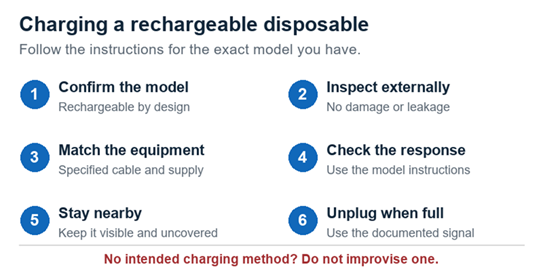
Use the exact model instructions throughout the charging process; stop if warning signs appear.
How to know when charging is finished
There is no universal full-charge color or blinking pattern. A model may use a percentage display, change its light behavior, or provide another documented signal. Read the relevant instructions before starting so you know the endpoint you are watching for.
A light going out is not enough to diagnose the situation by itself. If that behavior is not documented as “full,” check the connection and contact the manufacturer. Similarly, a battery icon must not be confused with an e-liquid indicator.
For elapsed-time questions, see our guide to how long to charge a disposable vape and when to unplug. Use model-specific instructions rather than an estimate copied from another product.
If the disposable vape will not charge
Keep checks external and stop immediately if there is damage, leakage, unusual heat, or a burning smell. When the device appears intact, review the setup before blaming the battery:
- Confirm that the exact model supports recharging and that you identified its charging port correctly.
- Check whether the cable and power source match the instructions. If replacements are permitted, use known-working, approved equivalents.
- Inspect the connector and cable for damage. Do not keep bending the cable to maintain a connection.
- Check the manual for the indicator you are seeing. If the expected response remains absent, disconnect and contact support.
Send support the model name, indicator behavior, cable type, and power-source specifications. Note any drop or moisture exposure. Do not bypass charging protection or attempt a battery replacement in a sealed disposable.
When charging cannot solve the problem
A charged battery and remaining liquid are separate requirements. If the liquid has run out, adding electrical energy will not restore it. Our guide to signs that a disposable vape is almost empty explains how to distinguish liquid depletion from a low battery without opening the device.
Do not treat persistent burnt flavor as a request for another charging session. Stop using the device and consult our explanation of what to do when a disposable vape tastes burnt. Repeated charging and test puffs are not a repair method.
If a device smokes or catches fire, move away, evacuate, and call your local emergency service from a safe location. Do not pick it up or try to carry it through the building. Fire and Emergency New Zealand’s battery guidance emphasizes evacuation when smoke or flames appear.
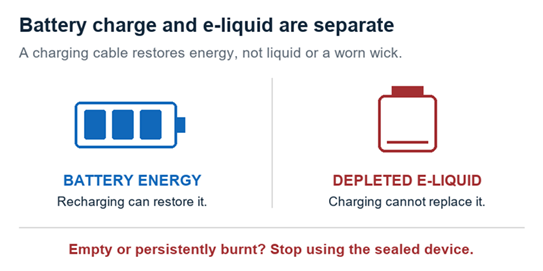
Battery charge and remaining liquid are different checks. An empty sealed device is not restored by charging.
Dispose of finished devices through the right collection route
Keep a sealed disposable intact and ask your local waste authority which collection service accepts it. In the U.S., the EPA recommends household hazardous waste collection for e-cigarettes. Do not put them in household trash or curbside recycling, where batteries can be crushed and cause fires.
Collection arrangements differ by location. Contact the facility before transporting a damaged or leaking device so staff can give appropriate instructions. Do not extract the internal battery simply because a nearby collection bin accepts loose batteries.
Frequently Asked Questions
Can I charge a disposable vape without a charging port
Do not improvise a charging method. Check the model instructions first. If it is not designed to recharge, arrange appropriate disposal when finished. Opening the housing, stripping a cable, or wiring directly to the battery is not an acceptable charging procedure.
Can I use my phone charger
Only if the vape manufacturer explicitly confirms that the charger and cable meet the model’s requirements. A matching USB connector or a familiar brand does not establish compatibility. Verify the approved charging input before connecting it.
Is a laptop USB port suitable
Use one only when the model’s instructions allow it and the connection meets its requirements. Do not assume that all USB sources are interchangeable. Ask the manufacturer if the manual does not identify suitable power sources.
Can I leave it charging overnight
No. Charge while awake and nearby, and unplug at the documented completion signal. London Fire Brigade advises against leaving vapes charging unattended or overnight. Charging protection does not replace supervision.
Does a blinking light mean the battery is dead
Not necessarily. Interpret the pattern using the exact model’s manual. Do not assume that every blink indicates low battery or continue charging a device with an unexplained fault signal. Disconnect it and ask support if the meaning is unclear.
Should I fully drain the battery before every charge
Follow the manufacturer’s recharge instructions rather than adopting a universal routine. For example, the GEEKBAR HERO manual provides its own low-battery prompt. That model’s threshold should not become a rule for every disposable vape.
Does recharging let me refill a disposable
No. Rechargeability describes the battery, while refillability describes the liquid system. Check both specifications separately. A sealed rechargeable disposable may still be intended for disposal once its original e-liquid is exhausted.
Sources and Further Information
Research and access date: October 12, 2026. Manufacturer examples apply only to the identified models. FDA and EPA advice is from the U.S.; UK and New Zealand organizations provide additional charging and fire precautions. Follow local collection and emergency arrangements.
- FDA tips to help avoid vape battery fires or explosions — Manufacturer instructions, charging location, and temperature precautions.
- ELFBAR official support — Rechargeable versus depleted single-use devices, including the BC10000 example.
- ELFBAR 600 product comparison — Distinction between the non-rechargeable disposable and rechargeable pod kit.
- GEEKBAR HERO user instructions — Model-specific charging connection, charger requirements, and non-replaceable battery.
- Electrical Safety First advice for vapes and electronic cigarettes — Charger compatibility, external checks, and avoiding modifications.
- London Fire Brigade advice on vaping and electronic cigarettes — Supervision, overnight charging, and warning signs.
- Fire and Emergency New Zealand lithium-ion battery guidance — Compatible equipment, disconnecting after charging, and fire response.
- EPA disposal guidance for individuals — U.S. household hazardous waste collection and avoiding household trash or recycling.
 9000 Puff Vapes
 12000 Puff Vapes
 15000 Puff Vapes
 20000 Puff Vapes
 30000 Puff Vapes
 40000 Puff Vapes
 50000 Puff Vapes
 60000 Puff Vapes
 80000 Puff Vapes
 100000 Puff Vapes